Welcome to Discussion Bucks

Earn Cash While You Engage!

Join the ultimate paid-to-post forum where your opinions earn you real cash! 🌟 💵 Earn While You Post: Share your thoughts and watch your earnings grow. 🌐 Global Community: Connect with members worldwide. 🎁 Exclusive Perks: Enjoy rewards and VIP perks. Get Started in Minutes!

SignUp Now!

How to easily find the memory and storage of a phone

What is the easiest and quickest method to find the memory and storage capacity of a smartphone or any other android device, especially when checking the device specifications offline, without a sim card?

I know, however, I can tell you the steps for my phone which is a Xiaomi 9t but obviously in ITALIAN.

1) First of all, among the pre-installed apps find this gear-shaped icon called IMPOSTAZIONI.
IMG_20260121_183116.jpg

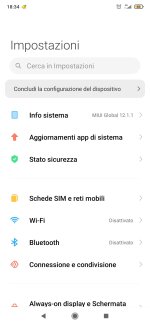
2) After this screen will appear and click on the item INFO SISTEMA
Screenshot_2026-01-21-18-34-23-209_com.android.settings.jpg

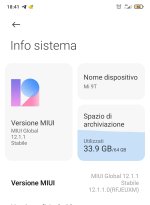
3) At this point, although each phone brand and model may differ somewhat, you should find an information sheet like the one below with all the features of your device. Among these, you can read the phone's internal memory storage space as it is called here in Italian: SPAZIO DI ARCHIVIAZIONE
IMG_20260121_184124.jpg

In my case, as you can see this value on the right, I have 64GB of total space, but 33.9GB of this is free.

I hope I've been clear enough my friend, unfortunately in the world we don't all speak the same language.
 
Last edited:
ln most phone devices, you would find that on the about phone section and check on the storage icon.
Post automatically merged:

ln most phones you can find that in the setting icon- storage then Hoover to the memory composition
 
Last edited:
Back
Top Bottom